

Our product, built by the AGRSoft team
UpTrendPos, the POS software that runs your whole shop
UpTrendPos is POS software for retail shops, pharmacies and growing chains. Billing, stock, udhaar, purchases and accounts live in one app that keeps working when the internet does not.
- 30+shop types supported
- 14 daysfree trial, no card
- Offlinebilling that syncs later
 Built with Flutter
 WhatsApp support
 Android
 Windows
 Web app
POS software made by a team that builds software every day
For ten years AGRSoft has designed websites and online stores for businesses in more than ten countries. Again and again, the shops we worked with had the same problem behind the counter: a paper register, a calculator and a notebook full of udhaar that nobody could total at the end of the month. UpTrendPos is the POS software we built to fix that.
It is a complete point of sale system: fast billing with a barcode scanner, live stock with low-stock and expiry alerts, a customer ledger for credit sales, purchase orders and supplier dues, and double-entry accounts that post themselves with every sale. The owner sees sales and profit for every branch from a phone.
The product has its own home at uptrendpos.com, with plans, downloads and setup guides. This page explains what the POS software does and why we built it the way we did.
Is your shop still running on a register?
These are the problems shop owners told us about most. Each one has a fix inside the POS software.
Forgotten udhaar
Every credit sale goes straight to the customer's ledger with the date and bill, so nothing is lost in a notebook.
Stock that runs out or expires
Low-stock and expiry alerts warn you before shelves go empty or medicines go out of date.
Power and internet cuts
Billing keeps going offline on Windows and Android. Sales sync to the cloud as soon as the connection returns.
Guessing your profit
Sales, cost of goods, expenses and salaries post to the accounts automatically, so profit is a report, not a guess.
Slow billing at rush hour
Scan, tap and print. Pack or piece sales, discounts and an 80mm thermal receipt in a few seconds.
Branches you cannot see
Each branch keeps its own stock and prices, and the owner sees all of them from one account.
Everything your shop needs in one POS software
No separate billing app, stock sheet and accounts software. One system, one set of numbers.
Fast billing
Barcode scanning, pack or piece selling, discounts, cash, bank or udhaar payments and thermal receipts.
Stock control
Live stock per branch with low-stock and expiry alerts, stock-in from purchases and returns.
Udhaar khata
A ledger for every customer, with balances, recoveries and reminders for what is due.
Purchases and suppliers
Purchase orders, received stock, supplier dues, credit terms and an aging report for payments.
Accounts and profit
Double-entry accounts, trial balance, profit and loss and day book, posted automatically.
Installments (qist)
Sell on installments with due dates, markup and a clear story of what each customer has paid.
FBR invoices
Fiscalised invoice numbers and QR codes for Tier-1 retailers registered with FBR.
Staff and salaries
Attendance, salary payments and sales commission, wired into the same accounts.
PC, phone and web
Use it on a Windows counter, an Android phone or tablet, or any browser.
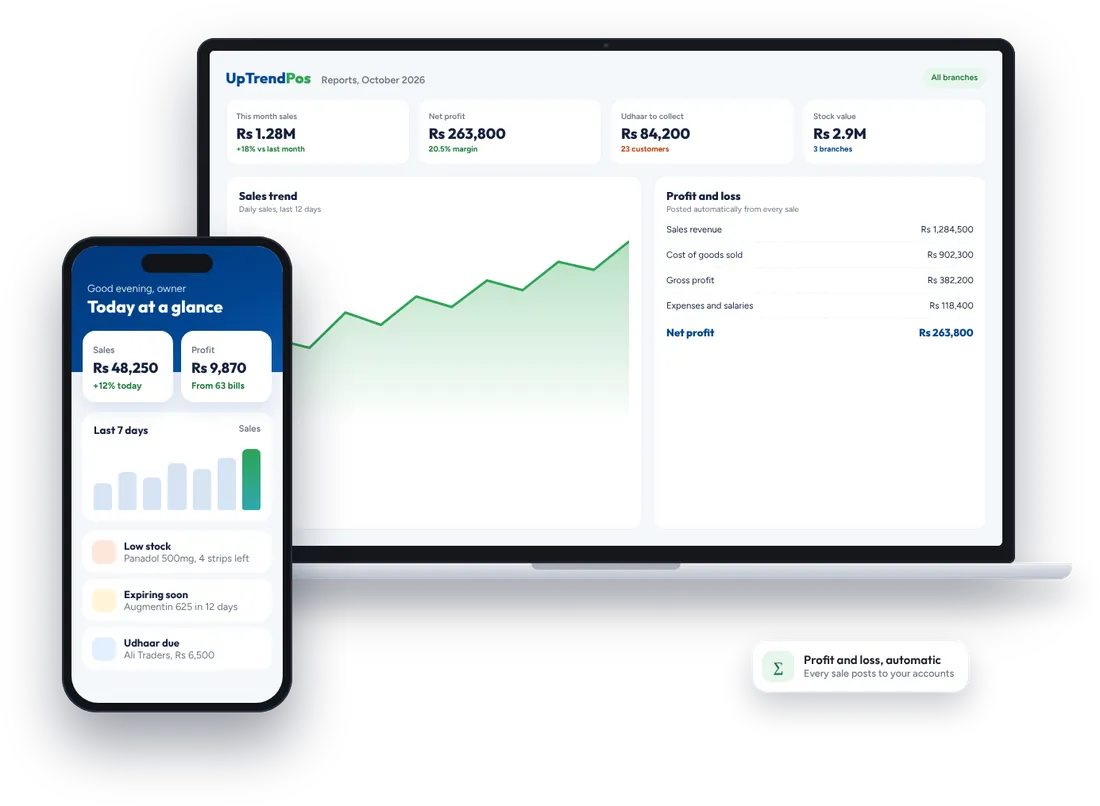
Know your profit every day, not once a year
Every sale, purchase, expense and salary in UpTrendPos posts a balanced entry to the accounts. That is why the profit and loss report, the trial balance and the balance sheet always agree with each other, without an accountant re-typing anything.
Owners usually start with the phone dashboard: today's sales, profit, bills, low-stock items and udhaar that is due. When you need more, the reports go down to a single bill or ledger line.
- Daily, monthly and branch-wise sales and profit
- Stock valuation, expiring items and fast and slow sellers
- Customer and supplier ledgers with aging
- Exports to PDF and Excel for your accountant
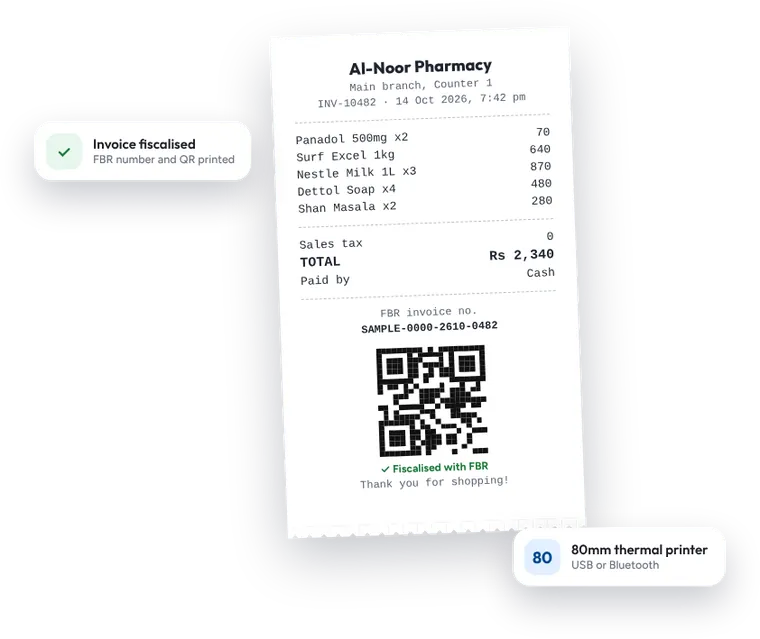
FBR invoices without the headache
Retailers in the Tier-1 category must issue invoices that are reported to the Federal Board of Revenue. In UpTrendPos you enter your FBR POS ID and token once, and every bill after that prints with a fiscalised invoice number and a QR code your customer can verify. The rules themselves are published on the FBR website.
FBR invoicing is part of the higher plans. Full details, including setup steps, are on the UpTrendPos FBR integration page.
Works with the hardware you already have
- Windows 10 or 11 PC or laptop
- 80mm thermal receipt printer
- USB barcode scanner
- Android phone or tablet
POS software for 30+ types of shops
Each business type gets the fields, units and screens it needs, from pack and piece for pharmacies to gold rates for jewellers.
- Grocery and kiryana
- Pharmacy and medical store
- Cosmetics and beauty
- Clothing and boutique
- Tailoring
- Shoes and bags
- Jewellery and gold
- Electronics and mobile
- Solar and electrical
- Hardware and paint
- Auto parts and tyres
- Furniture
- Toys, gifts and stationery
- Sports goods
- Baby and diaper
- Perfume and attar
- Crockery and household
- Agri inputs and veterinary
Pharmacies start with more than 17,000 medicines already loaded. See every supported business on the UpTrendPos industries page.
Start selling with the POS software in 4 steps
Most shops are billing on the same day. Our team helps on WhatsApp at every step.
Create your shop
Sign up on the web app and pick your business type. The 14-day trial starts straight away.
A few minutesAdd your products
Import a product list from a spreadsheet or add items by hand. Pharmacies get medicines preloaded.
Help with imports includedConnect the counter
Install the Windows or Android app, then plug in the receipt printer and barcode scanner.
Setup help on WhatsAppStart billing
Train your staff in one short session and make the first sale. Reports fill up from day one.
Free updates, always
Plans for every shop size
Try UpTrendPos free for 14 days
Monthly or yearly plans, with more branches and modules as you grow. Plans and current prices are listed on uptrendpos.com, or ask our sales team on WhatsApp.
- No card for the trialUse every feature for 14 days before you decide.
- Free updates on all plansNew features arrive automatically.
- Your data stays yoursEach shop's data is separate and backed up online.
Why a web design agency built POS software
The same team that designs WordPress websites and Shopify stores for clients also understands how a shop really runs: stock arriving late, customers paying in parts and owners who want the numbers on their phone. UpTrendPos is that experience turned into a product.
It is developed and supported from our office in Sahiwal, so help comes from the people who wrote the code. If your shop also needs a website or an online store connected to its stock, our web design services team can build that too.
POS software questions, answered
Still unsure? Ask us on WhatsApp and you will get a straight answer.
What is POS software?
POS (point of sale) software is the counter software that makes bills and, with every sale, updates your stock, customer ledgers, purchases and accounts. UpTrendPos does all of this in one app.
Does UpTrendPos work without internet?
Yes. The Windows and Android apps keep billing while offline and sync every sale to the cloud when the connection returns. Internet is only needed for the first login.
Is the POS software integrated with FBR?
Yes, for Tier-1 retailers registered with FBR. You add your FBR POS ID and token once, and bills print with a fiscalised invoice number and QR code. FBR invoicing is included in the higher plans.
Can I use UpTrendPos on my phone?
Yes. There is an Android app, and the web app runs in any browser, including Safari on iPhone. Owners often check sales and profit from their phone.
Which businesses can use this POS software?
More than 30 types of shops, including grocery stores, pharmacies, clothing and shoe shops, electronics, solar, hardware, jewellers, auto parts and tailors. Each type gets the fields and units it needs.
Can I manage more than one branch?
Yes. Each branch keeps its own stock and prices, and the owner sees every branch from one account. The number of branches depends on the plan.
How much does UpTrendPos cost?
There are monthly and yearly plans, and every new shop gets a 14-day free trial. Current plans and prices are listed on uptrendpos.com, or you can ask the sales team on WhatsApp.
Is my shop's data safe?
Each shop's data is kept separate, is visible only to the staff you authorise and is backed up online, so a broken computer does not mean lost records.
Who built UpTrendPos?
UpTrendPos is built and supported by AGRSoft, the web design and software team in Sahiwal behind more than 3,400 client projects.
Ready to run your shop on UpTrendPos?
Start the free trial today, or book a short demo and we will show you the POS software with your own products.